
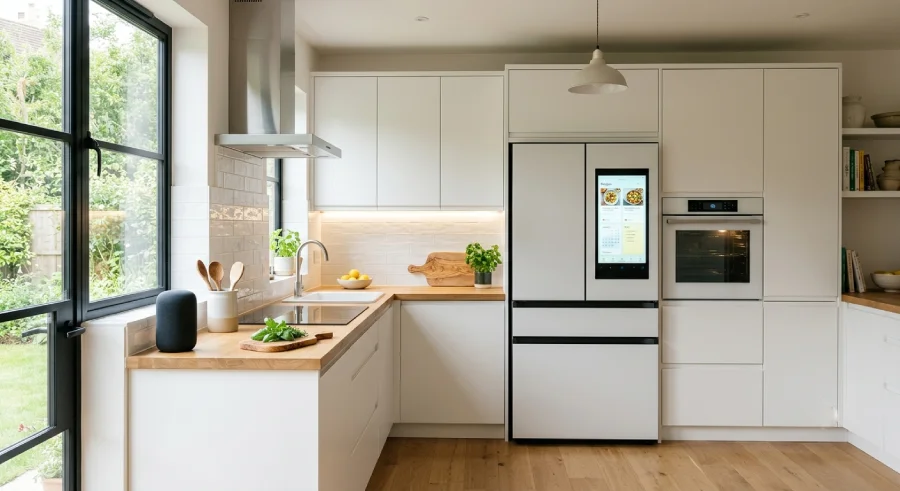
Smart kitchens are no longer a luxury reserved for tech showrooms. More homeowners are adding connected appliances, automated lighting, and voice control to their kitchens because these upgrades save time and cut daily frustration. If you’re wondering where to start or how far to take a smart kitchen upgrade, this guide breaks it down step by step.
You’ll learn what makes a kitchen “smart,” which appliances actually make a difference, how to plan a layout that supports built-in tech, and how to keep energy bills in check along the way. Whether you’re renovating from scratch or adding devices to an existing kitchen, this guide gives you a clear path forward.
What Are Smart Kitchens and How Do They Work?
A smart kitchen connects appliances, lighting, and sensors to a home network so they can be controlled remotely, respond to voice commands, or run on automated schedules. Instead of manually checking the oven or refrigerator, you get real-time updates and control from your phone or a smart speaker.
Defining the automated kitchen setup
An automated kitchen setup uses Wi-Fi or Bluetooth-enabled devices that talk to each other through a central hub or app. This includes refrigerators that track expiration dates, ovens that preheat on command, and faucets that dispense a set amount of water. The goal is simple: reduce manual steps and give you more control over what happens in your kitchen, even when you’re not standing in it.
Key benefits: Saving time, energy, and food waste
The biggest advantage of a smart kitchen is time saved on repetitive tasks. Preheating the oven from your car or starting the coffee maker before you get out of bed adds up over a year. Smart appliances also help cut energy waste by running only when needed and alerting you to inefficient habits.
Food waste drops too. Smart refrigerators with cameras and inventory tracking remind you what’s inside before you shop, so you buy only what you need. Over time, these small changes reduce both your grocery bill and your environmental footprint.
Essential Smart Kitchen Appliances for Every Home
Not every smart kitchen appliance is worth the investment. Focus on the devices that solve real daily problems rather than gadgets that just add complexity.
Voice-controlled refrigerators and inventory tracking
Modern smart refrigerators come with interior cameras and inventory tracking apps. You can check what’s inside from the grocery store, get alerts when milk is about to expire, and even ask your fridge to add items to a shopping list through voice commands. This cuts down on duplicate purchases and last-minute grocery runs.
Precision induction cooktops and voice-controlled appliances
Induction cooktops paired with voice-controlled appliances let you set exact temperatures without guesswork. Many models sync with recipe apps, adjusting heat automatically as a dish cooks. This is especially useful for anyone learning to cook, since it removes the trial and error that comes with traditional stovetops.
Smart ovens with remote preheating and built-in cameras
Smart ovens let you preheat remotely, so dinner starts the moment you walk through the door. Built-in cameras let you check on food without opening the door and losing heat. Some models also send alerts when a dish is done, which is helpful for anyone who tends to forget what’s in the oven.
Smart Kitchen Design and Built-in Tech Integration
Good smart kitchen design isn’t just about buying gadgets. It’s about planning the space so technology fits naturally instead of looking bolted on.
Hidden wiring and built-in smart home tech
Built-in smart home tech works best when wiring and hubs are planned during renovation, not added after the fact. Hidden charging stations, in-wall sensors, and concealed wiring keep the kitchen looking clean while still supporting a full network of connected devices. If you’re renovating, talk to your electrician early about where outlets and low-voltage wiring need to go.
Practical smart kitchen layout ideas for small and large spaces
Smart kitchen layout ideas differ depending on square footage. In smaller kitchens, compact smart appliances and under-cabinet lighting free up counter space while still delivering automation. In larger kitchens, you have room for a dedicated smart hub station, multiple voice assistants, and zoned lighting for different work areas.
A few layout tips that work in most homes:
- Place voice assistants near the main work zone, not tucked in a corner
- Keep charging stations close to countertops where devices are used most
- Position smart displays at eye level near the fridge or pantry for quick access
- Group appliances by task (prep, cook, clean) to reduce unnecessary movement
Task and ambient lighting with automated schedules
Lighting is one of the easiest smart upgrades to add. Task lighting over counters and stovetops improves visibility for cooking, while ambient lighting sets the mood for everyday use. Automated schedules can dim lights in the evening or brighten them during meal prep, all without you touching a switch.
Energy Efficiency in the Modern Kitchen
Smart kitchens aren’t just convenient. When set up correctly, they can lower your utility bills too.
Selecting energy-efficient smart appliances
Look for appliances with ENERGY STAR certification or similar ratings when shopping for energy-efficient smart appliances. These models are built to use less power without sacrificing performance, and many include usage reports that show exactly how much energy each device consumes.
Monitoring water and electricity usage via mobile apps
Most smart kitchen brands now offer apps that track water and electricity use in real time. This makes it easy to spot which appliance is driving up your bill. Smart dishwashers, for example, often show how much water a cycle uses compared to older models, giving you a clear picture of savings over time.
| Appliance | Average Energy Savings vs. Standard Models | Common Smart Feature |
|---|---|---|
| Smart Refrigerator | 10-15% | Inventory tracking, temperature alerts |
| Smart Dishwasher | 12-20% | Water usage reports, delayed start |
| Smart Oven | 8-12% | Remote preheating, auto shut-off |
| Smart Lighting | 20-30% | Motion sensors, scheduled dimming |
Step-by-Step Kitchen Automation Guide for Beginners
You don’t need to automate everything at once. A phased approach keeps costs manageable and lets you learn the system as you go.
Phase 1: Upgrading basic plugs and lighting
Start with smart plugs and smart bulbs. These are affordable, easy to install, and give you an immediate sense of how automation works. Set schedules for lights and test voice commands before investing in bigger appliances.
Phase 2: Installing core smart kitchen appliances
Once you’re comfortable with the basics, move on to core smart kitchen appliances like a smart oven, refrigerator, or dishwasher. Choose one appliance at a time so you can learn its app and settings without feeling overwhelmed.
Phase 3: Syncing devices to a central smart home hub
The final phase connects everything to a central smart home hub. This is where the real value of a smart kitchen shows up, since all your devices work together instead of operating separately. You can create routines like “Good Morning,” which turns on lights, starts the coffee maker, and preheats the oven with a single command.
Final Takeaway: Is a Smart Kitchen Worth the Investment?
A smart kitchen pays off when you choose upgrades that solve real problems in your daily routine. You don’t need every gadget on the market. Start small with lighting and plugs, add appliances that match your cooking habits, and build toward a connected system at your own pace. Over time, the time saved, energy reduced, and convenience gained make the investment worthwhile for most households.


Comments are closed.