
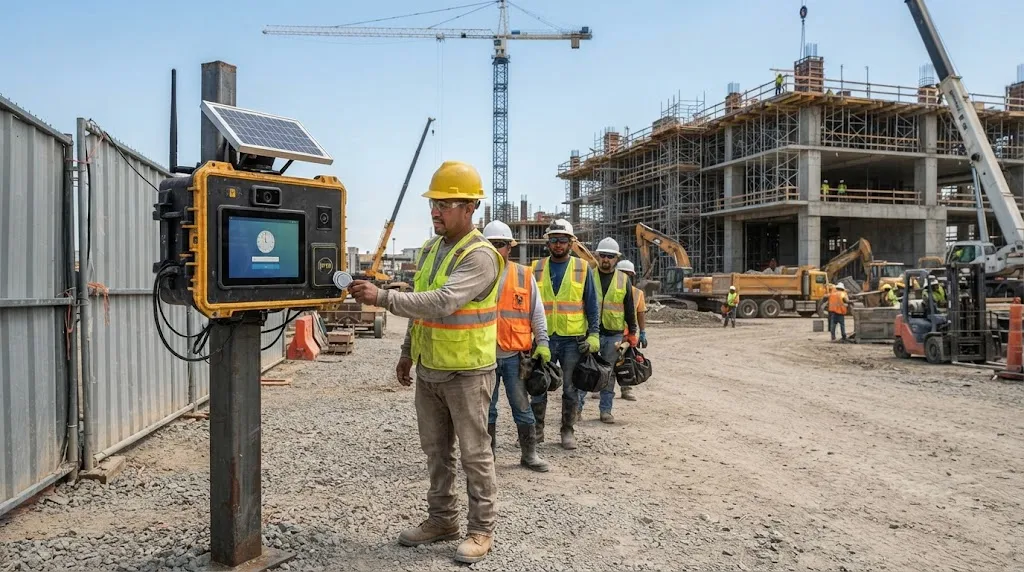
A portable time clock lives on the jobsite. Workers clock in and out on site, often where power and connectivity cannot be taken for granted, and the device has to survive weather, dust, and rough handling. On an active site, the clock is part of the field equipment rather than an office accessory, so it has to stay dependable in conditions that would sideline a phone, a fingerprint reader built for an office, or a paper sheet. For contractors who would rather not depend on every worker carrying a charged phone with signal, a dedicated clock can be the more reliable way to capture field hours. This guide reviews the portable options worth evaluating in 2026, from rugged hardware to kiosk apps.
What makes a jobsite time clock work
The core job is capturing compensable time correctly. The FLSA’s definition of compensable hours worked covers the time a worker is required to be on duty or at the worksite, which is precisely the window a jobsite clock is meant to record. If that capture is unreliable, every payroll and billing number that follows inherits the error, and reconstructing it after the fact is slow and contestable.
Durability is the other half of the equation. Construction work happens outdoors in demanding conditions, and OSHA’s construction industry safety standards reflect how variable and hazardous those environments can be. A clock that mounts at the gate or on a trailer has to keep working through heat, cold, rain, and dust, frequently with no outlet anywhere nearby.
From there, a handful of features tend to decide the fit:
- Durability: weatherproof rating and a wide operating temperature range.
- Power: solar or long-life battery so the device does not depend on an outlet.
- Connectivity: cellular data or reliable offline storage that syncs later.
- Verification: how the device confirms identity at the punch.
- Setup and payroll: fast mounting and clean data flow into payroll.
1. SmartBarrel
SmartBarrel offers a portable time clock for construction in its TimeClock 4.0 device, which is solar and battery powered with built-in LTE, so it does not depend on a jobsite outlet or Wi-Fi. It mounts magnetically or with screws in minutes, carries an IP65 weather rating, and operates across a wide temperature range. Workers check in with AI facial verification that compares each clock-in photo to that worker’s prior photos, working with hard hats and safety glasses, and self-registered fobs cover anyone without a phone. The same verification is available through a kiosk app, so smaller or fast-moving sites can run without dedicated hardware while keeping the standard consistent. A worker types a phone number, takes a photo, and verification takes about three seconds, with the photo, timestamp, and location captured on every punch.
2. ExakTime JobClock Hornet
The JobClock Hornet, part of the ExakTime family, is a rugged, battery-powered hardware clock designed for harsh sites. Based on publicly available documentation, it runs up to about 21 days on a charge, uses color-coded key fobs for clock-in, connects over LTE on the Hornet model, and syncs data to the cloud roughly every hour. A companion LE model stores data for manual upload instead of automatic syncing. It is a long-established option for fixed or long-duration jobsites that want a durable clock-in station. Color-coded fobs let crews tag different cost codes or locations at the punch, which keeps basic job costing intact even on a hardware-only setup.
Quick context
Compensable hours worked include the time a worker is required to be on duty or at the worksite, so a jobsite clock’s first job is capturing that on-site time accurately and reliably, even with no power or signal nearby. (Source: U.S. Department of Labor)
3. TimePilot Tap
The TimePilot Tap is a compact, pocket or toolbox-sized clock that suits crews moving frequently between sites. Workers use individual key fobs to punch, the battery lasts about a year, and, based on publicly available documentation, timecard data is synced by connecting the device to a computer at the office rather than automatically. That makes it simple and rugged, with the tradeoff that supervisors do not get live data during the day.
4. EasyClocking
EasyClocking offers rugged jobsite clocks built around multispectral fingerprint sensors and RFID cards, designed to read reliably on the worn or dirty hands common on a construction site. It emphasizes outdoor durability and contactless options, and pairs the devices with a mobile and web app for managing hours, schedules, and attendance across sites. It is a fit for contractors that prefer fingerprint or card-based verification on a physical device. The fingerprint sensors are designed to read through the wear and grime common on construction hands, and RFID cards offer a faster tap option where speed matters.
5. Connecteam
Connecteam takes a software-first approach, turning a shared tablet or phone into a kiosk that crews clock in and out from using a PIN and an optional selfie, with GPS on individual punches and geofencing. It is an option for contractors that prefer not to buy dedicated hardware for every site, with the understanding that it relies on a connected device rather than a ruggedized clock that can stand alone on the gate. It supports clock-in time windows and breadcrumb trails, which some contractors use to confirm crews stayed on site through the shift.
How to choose the right fit
The decision usually turns on site conditions and how much crews move. Fixed, long-duration sites with no power favor solar or long-battery hardware with cellular connectivity. Crews that hop between many short jobs may prefer a pocket device or a kiosk app. Whatever the form factor, the test is the same: does it capture verified on-site time accurately, survive the conditions, and deliver clean data to payroll without manual cleanup?
What should a portable clock survive on a jobsite?
At minimum, a jobsite clock should handle rain, dust, and a wide temperature swing without failing, since it often sits outdoors for the length of a project. Weatherproof ratings and a stated operating temperature range are the quickest way to compare durability across devices.
Hardware clock or kiosk app: which is better?
Neither is universally better; it depends on the site. A standalone, weatherproof device tends to be the most reliable choice on larger or remote sites with no power and spotty signal, while a kiosk app is practical for small crews or jobs that turn over quickly. Some systems offer both and apply the same verification standard either way.
What happens to clock-ins when a site has no signal?
Strong jobsite clocks either carry their own cellular connection or store punches locally and sync when a connection returns, so a dead zone does not become a gap in the record. Confirming how a device handles offline capture is worth doing before deployment.
Are biometric clocks legal on a jobsite?
Biometric time clocks are widely used in construction, but some states regulate how biometric data is collected and stored, with Illinois being a frequently cited example. Contractors should confirm the requirements that apply where they operate and choose a vendor whose data practices meet them. This is general information, not legal advice.


Comments are closed.