
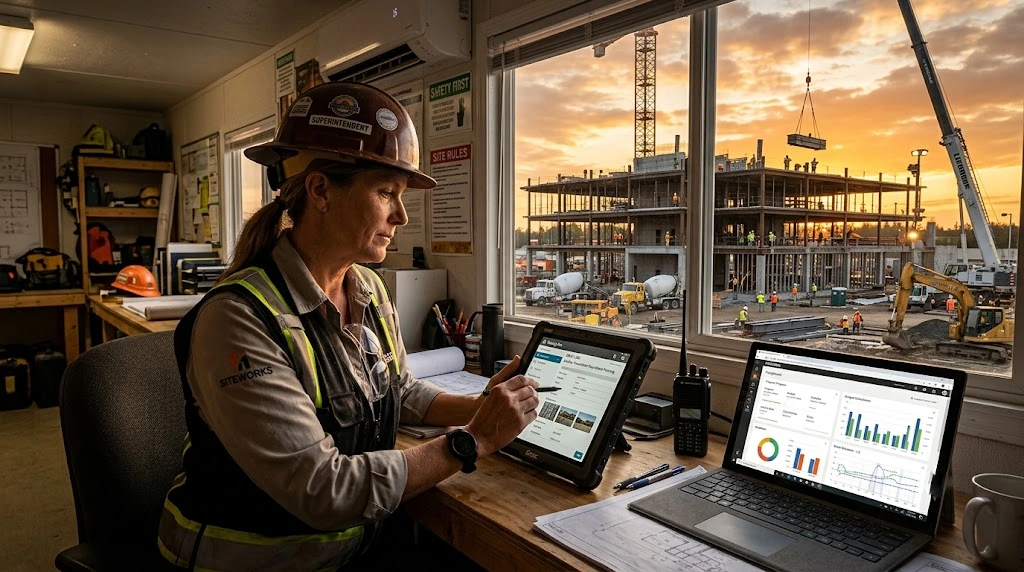
The construction superintendent’s day rarely ends at the punch-out whistle. Walk into any project trailer at 5:30 in the afternoon and there is a good chance the super is still there, hunched over a laptop, trying to remember what happened at 9:14 that morning when a concrete delivery showed up an hour late and the inspector pulled the foreman aside about a stair pour. The daily log has to be filed. The log is supposed to make the job easier. Often it makes the day longer.
Daily log apps were sold to construction as a fix. Replace the paper, save time, get cleaner records. Many have delivered on parts of that promise. But superintendents who have been using these tools for several years now have developed a clear sense of what is working and what is not. The frustration is rarely with the concept. It is with the execution: apps that ignore how a jobsite actually flows, apps that ask for the same information twice, apps that produce reports nobody reads.
This is what superintendents wish their daily log app did differently.
Stop asking for data the system already has
The first complaint, almost universally, is duplicate entry. A superintendent who has already approved time cards, signed off on a delivery, and reviewed a safety incident in three other systems does not want to retype that information into the daily log. The data exists. The app should pull it.
Workforce labor shortages have made this complaint sharper. According to the Associated General Contractors of America’s 2025 Workforce Survey, 92 percent of construction firms report difficulty filling open positions, and 45 percent of firms have had projects delayed by labor shortages. When superintendents are stretched across more sites with fewer hands, every minute they spend re-entering information they already captured somewhere else is a minute they are not walking the site, talking to subs, or planning tomorrow’s pour.
The fix is integration, not more fields. A daily log that pulls headcount from the time tracking system, weather from a connected feed, and safety incidents from the same incident form already submitted in the morning leaves the superintendent free to add what only they can add: context, judgment, photos of conditions that did not quite trigger an incident report but probably will tomorrow.
Recognize that “what happened today” is captured throughout the day, not at 5 p.m.
Many daily log apps are built around an end-of-day form. The superintendent sits down, opens the app, and reconstructs the day from memory. This model has the same problem as the paper clipboard it replaced: it depends on remembering things that were memorable when they happened and forgettable by dinner.
Superintendents want a system that captures observations as they occur. A photo taken at 7:42 a.m. should land in the day’s log automatically. A note dictated into a phone after a conversation with the GC’s project manager should attach itself to the right project, the right date, the right context. A safety walk completed at 11 a.m. should already be reflected when the report is finalized in the afternoon. The app should not be asking the superintendent to remember the day. The app should be helping the superintendent assemble the day.
This is also where modern construction daily log app design makes a real difference. Tools that draw from data already collected during the workday, rather than treating the daily log as a separate end-of-day form, produce more accurate records and give the superintendent back a chunk of evening time. The shift from “fill out the log” to “review and submit the log” is small in language and large in practice.
Reduce the number of apps the superintendent has to open
A superintendent on a large commercial job is often expected to use a project management platform, a time tracking system, a safety reporting tool, an RFI tracker, a punch list app, a daily log app, and email. Sometimes more. The apps rarely talk to each other in a meaningful way. Each one wants its own login, its own version of the project list, and its own slightly different way of organizing the same job.
Deloitte and Autodesk’s State of Digital Adoption in the Construction Industry 2025 report found that the median construction business operates with 11 separate data environments to collect, manage, and share project data. Forty-eight percent of surveyed businesses cited additional training and skills development costs as a challenge of multiple data environments, and 45 percent cited higher operational costs. Construction leaders surveyed in the report estimated that moving to a more uniform data environment would save them approximately 10.5 hours per week.
That number lines up with what superintendents say in the field. The fragmentation tax is real. The wish is not to eliminate every tool. It is to have the daily log act as a coherent layer on top of the other systems, drawing data forward rather than asking for it again.
Make photos do more work
Photos are the most underused data field on most daily log apps. Superintendents take dozens of pictures a day. They use them to document progress, flag conditions, capture deliveries, and protect themselves on T&M jobs where the GC will eventually want proof of crew size on a particular morning.
The trouble is that most apps treat photos as attachments. A photo gets dropped into a daily log entry as a thumbnail with a caption nobody reads. A better model treats photos as primary records: timestamped, geotagged, attached to the project automatically, and searchable later by date, location, or tag. A superintendent who needs to find the picture of the trench from three weeks ago should be able to search for “trench, north side, October 14” and have it appear, not scroll through 600 thumbnails.
Photos also matter for billing disputes. Superintendents have seen what happens when an owner challenges a T&M invoice and the contractor’s only defense is a paper log filled out from memory. A clear, timestamped photo of the crew on site at the disputed hour ends the conversation before it becomes a claim.
Stop forcing structure that does not match the trade
Daily log apps tend to assume a generic commercial project. The defaults work fine for a general contractor managing trades on a high-rise. They start to break down for a self-perform trade contractor running multiple smaller jobsites, a specialty contractor whose crew counts vary by hour, or any operation where the rhythm of the day does not fit the template.
Superintendents on these projects want flexibility. They want to skip fields that do not apply, add fields that do, and have the system remember those preferences instead of resetting every day. They want crew categories that match how their company actually tracks work, not a generic “labor” line. They want the app to feel like it was built for their kind of project, not configured to barely accommodate it.
This is one of the harder things for software vendors to get right because it requires giving up the assumption that their template is the right template. The superintendents who are happiest with their daily log apps tend to be the ones whose companies took the configuration work seriously up front.
Make the report something the office actually reads
The final frustration is on the receiving end. Many superintendents file daily logs that nobody at the office seems to look at. The report goes into a folder. It might be opened during a billing review or a dispute. It is rarely used to actually run the project.
Superintendents would like that to change. They want the office to surface trends from the daily logs, flag patterns across projects, and bring observations back into project conversations. A note about a recurring delivery problem on a Tuesday should turn into a vendor conversation by Wednesday, not sit in a database until somebody pulls it during a claim. Daily logs are most useful when they feed real-time decisions, not when they feed an archive.
This is partly a tooling question and partly a culture question. The tooling has to make the data accessible and searchable. The culture has to make reading the daily log a habit rather than a paperwork audit. The superintendents who feel best about their reporting workflow tend to work for companies that close that loop.
A note on productivity, briefly
The construction industry’s productivity story is worth holding in mind whenever a superintendent’s time is being discussed. According to the U.S. Bureau of Labor Statistics, labor productivity in highway, street, and bridge construction has declined every year from 2021 through 2024, with output falling 3.7 percent and hours rising 2.1 percent in 2024 alone. Multifamily residential construction productivity fell 12.8 percent in 2024. Industrial building construction productivity rose 16 percent in the same year, showing that the pattern is not uniform, but the broader picture is that hours are being spent without proportional output gains in many segments.
Superintendents are at the center of that equation. Every hour pulled away from the field for administrative work is an hour that does not translate to output. Daily log apps that demand more of that hour, rather than protecting it, are working against the people they are supposed to serve.
What good looks like, in the superintendent’s words
If the patterns above are inverted, the picture of a useful daily log app comes into focus. It captures jobsite data automatically as the day unfolds, rather than asking for it after the fact. It draws from the systems the company already uses for time, safety, and project management, rather than asking the superintendent to enter the same information twice. It treats photos as searchable records, not afterthoughts. It adapts to how a particular trade or company actually tracks work. It feeds reports that the office reads and acts on. It respects the superintendent’s time, because the superintendent has very little of it left to spare.
None of this is a radical wish list. Most of it is the practical experience of people who have lived the workflow long enough to know what gets in the way. Software vendors who spend a few days riding along with a superintendent on a real project tend to come back with a much shorter list of features and a much longer list of things to remove. That instinct, more than any single feature, is what superintendents are asking for.
The daily log will always be part of the job. The question is whether the tool helps the superintendent get back to the field faster or keeps them in the trailer past dark. That is the difference between a daily log app and a daily log app that gets used.

Comments are closed.