
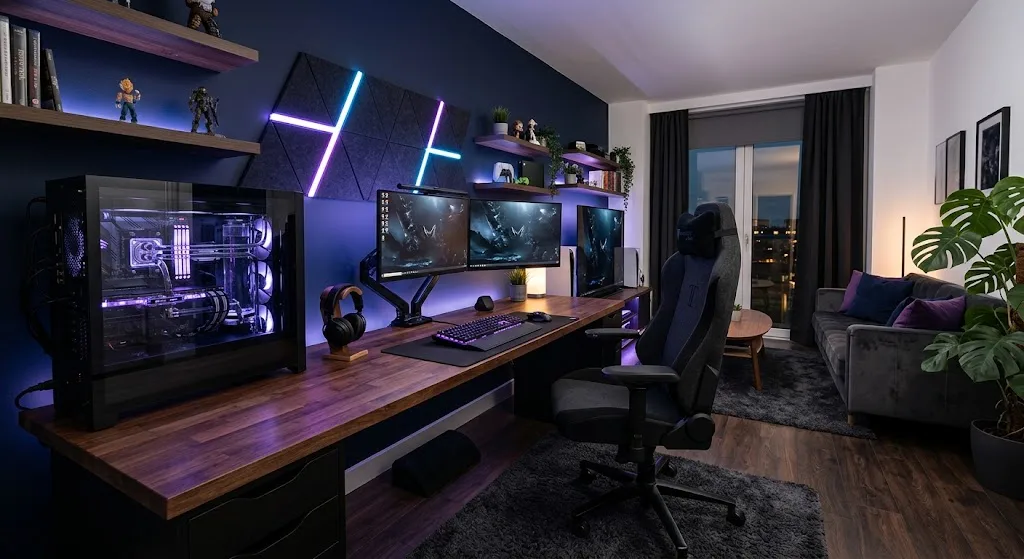
A great gaming room setup starts with a solid desk and an adjustable chair. Add a monitor at eye level, soft bias lighting behind the screen, and tidy cables. Then layer in sound control, airflow, and a few personal touches. Get the basics right first, and the rest is easy.
You spend hours in your gaming space, so it should feel good the moment you walk in. A great gaming room setup does not need a huge budget or a giant room. It needs a plan, a few smart choices, and a little patience.
Most people start by buying the flashiest gear. Then they find the desk is too small, the chair hurts after an hour, and the cables are tangled behind everything. One design guide makes a point worth remembering: an expensive rig in a badly planned room looks worse than a cheaper setup that was designed with care. The room is part of the build.
This guide walks you through each step in the order that matters most. We start with the room itself, then move to the desk, chair, monitor, lighting, cables, sound, and decor. By the end, you will have a clear plan you can follow at your own pace.
Start With the Room You Have
Before you buy anything, walk around your space and look at it closely. Where are the outlets? Where does the sun come in? Which wall is the longest? Your answers will shape every choice that follows.
A simple layout puts the desk against the longest wall, with the chair facing it and open floor behind you for gear and storage. A corner setup also works well, because it saves wall space and gives an L-shaped desk room to spread out. If you share the room with a console and a TV, split it into two zones. One zone is for desk play, and the other is for couch play.
Check your windows, too. Sunlight on your screen causes glare and heats up the room. Ergonomics experts suggest setting your monitor at a right angle to a window, so you are not facing it or sitting with it behind you. If you can’t move the desk, a curtain or blind solves most of the problem.
Finally, think about power. Count everything you will plug in, including the PC, monitors, console, lights, and chargers. Use a surge-protected power strip. In places where outages happen often, a backup power solution is treated as a core part of a modern gaming room.
Pick a Desk That Fits Your Gear

Your desk holds everything, so size matters. One of the most common mistakes is choosing a desk that is too small. Measure your monitors, keyboard, and mouse area before you shop. Then add a little extra room for speakers, a controller, and a drink.
Depth is the number people forget. A desk under 60 cm deep pushes a 27-inch monitor too close to your face. Aim for 65 to 70 cm, so the screen sits 50 to 70 cm from your eyes. If you play with a large mouse pad and sweep your arm wide, you also need extra width.
Shape is a personal call. A straight desk suits a simple setup against one wall. An L-shaped or corner desk gives you more surface, and a corner desk keeps the back of your monitor near a wall, which is where bias lighting works best. Look for features like headset hooks and cable routing, because they save you work later.
Stability counts more than looks. A wobbly desk can ruin an intense moment in a match. Push on the corners in the store, or read reviews that mention shaking. Built-in LED strips are fun, but you can add those later for a few dollars.
Finally, check the height. Your desk should let your forearms rest flat without lifting your shoulders. One occupational therapist notes that a typing surface should be lower than most people expect, so your elbows sit slightly past 90 degrees.
Choose a Chair You Can Sit In for Hours

Think about how long a ranked session lasts. Then think about how your back feels after the third one in a row. A good chair is the best money you can spend on your setup, because it affects how you feel every single day.
Fit matters more than style. Racing-style chairs and office chairs can both work well. What counts is how many things you can adjust. Set the seat height so your thighs are about parallel to the floor and your feet rest flat on the ground or on a footrest. The same checklist suggests leaving a gap of about three fingers between the seat edge and the back of your knees.
Check your back support next. Look for a backrest that reclines slightly, around 100 to 110 degrees, along with adjustable lumbar support. If your chair has no lumbar support, a small pillow placed at lower back height can help.
Armrests deserve a quick test, too. Your elbows should bend near 90 degrees, and your shoulders should stay relaxed. If you feel your shoulders creeping up, lower the armrests or raise the chair.
Even a perfect chair has limits. Stand up, stretch, and walk around between matches. Your body will thank you, and your focus will stay sharper.
Set Up Your Monitors the Right Way
Your screen is where you spend most of your attention, so position it with care. Put the monitor straight in front of you, not off to one side. Placing it sideways encourages awkward neck postures.
Height and distance come next. The top of the screen should sit at or just below eye level, and the monitor should be about an arm’s length away. Larger screens need more distance than small ones. If the text looks small, increase the font size instead of leaning in.
A monitor arm makes all of this easier. Arms free up desk surface, bring the screen to the right eye height, and make multi-monitor setups much cleaner. You can also slide the monitor back or forward in seconds, which helps when friends come over to watch.
Should you pick an ultrawide or two screens? Don’t buy a second monitor just for the look. It earns its desk space only if you really use it. If you go with two, the experts at EHS Today suggest placing the main screen straight ahead and the second one beside it at the same height and distance, when you use the main screen most of the time.
Finally, pay attention to refresh rate. A gaming monitor with a high refresh rate looks smoother in fast games, and that makes a real difference in shooters and racing titles. Pair it with a good graphics card, or you will not see the full benefit.
Use Lighting to Set the Mood and Protect Your Eyes

Lighting turns a plain room into a place you want to be. The best approach uses several light sources instead of one bright bulb. Combine ambient light, such as LED strips or smart bulbs, with task light from a desk lamp and one accent piece, such as a backlit shelf or a neon sign.
Start with bias lighting, which is a light strip mounted behind the monitor. It softens the contrast between a bright screen and a dark room. Another source notes that it can reduce eye fatigue during long sessions. It also costs very little, and one guide calls it the cheapest aesthetic upgrade you can make.
Next, add a lamp for tasks. When you write notes or read a guide, you need light that doesn’t wash out the screen. Point it away from your monitor so it does not bounce back at you.
To check for glare, try this test. Turn the monitor off and look for reflections on the black screen. If you see a lamp or window, move the light or turn the monitor a little. Also avoid playing in total darkness. Try not to use a computer in a dark room.
Last, keep color choices simple. Two or three colors look planned, while a full rainbow can look messy. Many smart lights can sync with your games or music, which is fun for special nights.
Tame Your Cables
You can build a beautiful setup and still ruin it with loose cables. One lighting guide warns that a well-lit gaming room quickly loses its appeal if cables and accessories are scattered. Good news: this is one of the easiest problems to fix.
Start by unplugging everything and sorting it. Group cables by device, then bundle each group. Use cable sleeves, clips, and under-desk trays to hide the wires. A tray mounted under the desk holds your power strip and keeps plugs off the floor.
If you use a monitor arm, take advantage of its built-in channel. Most arms priced above about 800 rand include a cable channel that routes power and signal cables through the arm itself. That leaves almost nothing visible on the desktop.
Leave a little slack so you can move the desk or swap a device without pulling everything out. Label both ends of important cables with small tape tags. Six months from now, you will be glad you did.
Mounting a TV on the wall also helps. It saves desk space and gives the room a cleaner, more modern look. Dust the area behind your gear every few weeks, too, since cables and vents collect dust fast.
Plan Your Sound and Temperature
Sound shapes how a room feels. Headsets work well when others are sleeping nearby, while speakers add punch when friends are over. Think about who else lives in your home. One guide describes the ideal room as soundproofed enough that you can yell at teammates without waking the kids.
You do not need a recording studio to reduce noise. Thick rugs, heavy curtains, and bookshelves absorb sound and cut echo. A closed door with a draft stopper helps even more. Wall panels are another option, and many can double as decor.
Heat is the next concern. Gaming PCs and consoles give off a lot of warmth during long sessions. A desk fan or better ventilation can keep you from overheating. Leave a few inches around your PC case so air can move freely, and avoid pushing it into a closed cabinet.
Keep your gear out of direct sunlight, too. Make sure the setup isn’t sitting in direct sun. That protects both your screen and your comfort. If the room still runs warm, a small fan placed across from the window can help.
Add Personal Touches
Once the basics work, it’s time to make the room feel like yours. Pick a style first. Popular looks include clean white, minimalist, natural wood, stealth black, full RGB, and plant-filled setups. Choosing one direction keeps your choices from fighting each other.
Small items make a big difference. A custom desk mat protects the desk and adds personality. A shelf for collectibles, a poster you love, or a neon sign gives the walls something to say. Plants add color and soften a room full of black plastic.
Think about comfort for others as well. If friends visit, add a small couch, a bean bag, or a pair of stools. Guests who are comfortable stay longer, and games feel more fun with company. A rug under your chair also warms the floor and cuts noise.
Keep a little empty space on purpose. Crowded shelves and walls make a room feel smaller. Leave open areas so your favorite pieces stand out.
Small Rooms and Tight Budgets
Not everyone has a spare bedroom. A small space can still work well if you use the walls and corners. A corner desk uses space that is otherwise empty, and a monitor arm clears the desktop. Vertical shelves hold games and controllers without taking up floor room.
If your budget is tight, spend in the right order. Sort out the desk and chair first. Get them right and the rest is decoration; get them wrong and no lighting can save the room. After that, add a monitor arm, a bias light strip, and cable management. Decor can come last.
Several improvements cost nothing at all. Move your desk away from the window, tidy the cables you already have, and set a reminder for the 20-20-20 rule. Every 20 minutes, look at something at least 20 feet away for 20 seconds. It takes less than a minute and gives your eyes a short rest.
You can also build slowly. Buy one item a month and test it before the next. That way you learn what you actually need, and you avoid paying for things that end up in a closet.
Build Your Setup One Step at a Time
A strong gaming room comes together in stages. Start with the layout and the light in your room. Add a sturdy desk and a chair that fits your body, then set the monitor at the right height and distance.
After that, bring in bias lighting and clean up your cables. Plan for sound and airflow so long sessions stay comfortable. Finish with the touches that make the space feel like yours.
Do not worry about getting everything perfect on day one. Your first version only needs to be comfortable and safe for your body. You can always change colors, swap a lamp, or move a shelf next month.
Pick one step from this guide and do it tonight. Maybe that means measuring your desk, or maybe it means taping up a light strip behind your screen. Small steps add up fast, and you will soon have a room you look forward to walking into.

Comments are closed.