
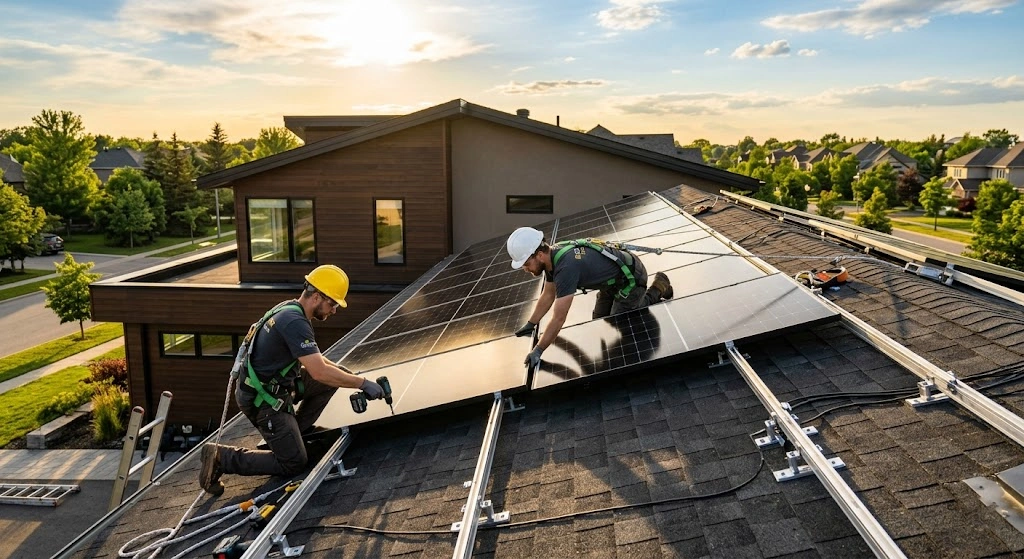
Installing solar panels at home involves assessing your roof, calculating your energy needs, getting permits, mounting the racking system, wiring the panels to an inverter, and connecting everything to your electrical panel. Most residential installations take two to three months from planning to powering up.
So you’ve decided to go solar. Great choice. Solar panels can seriously cut your monthly electricity bills and protect you from rising utility rates for decades. The process isn’t something you knock out over a weekend — a typical installation takes two to three months from start to finish — but when you understand each step, it becomes a lot less overwhelming.
This guide walks you through the full process, from figuring out how much power you need to the moment your system flips on.
Step 1: Understand Your Energy Needs

Before you buy a single panel, you need to know how much electricity your home actually uses. Pull out your last 12 months of electricity bills and look at your kilowatt-hour (kWh) consumption each month.
This information becomes the basis for determining the size of the solar energy system you’ll need. A good rule of thumb: a home using 10,000 kWh annually in an area with 5 peak sun hours would need approximately a 6.8 kW system. Your installer can run these numbers precisely using satellite imagery and local weather data, but knowing your baseline helps you have an informed conversation.
Step 2: Assess Your Roof

Your roof is doing most of the heavy lifting here, so its condition matters a lot. A solar installer will check your roof’s age, angle, material, and how much shade it gets throughout the day.
Installing solar panels on a roof approaching the end of its lifespan creates unnecessary complications. Removing and reinstalling panels for roof replacement later adds $1,500 to $3,000 in labor costs. If your roof has 10 or more years of life left, you’re in good shape. If it doesn’t, repair or replace it first — it’ll save you money in the long run.
South-facing roofs with a pitch between 15 and 40 degrees tend to produce the most energy in the Northern Hemisphere. That said, east- and west-facing roofs can still generate solid output. Your installer will run a shading analysis to confirm your roof’s actual production potential.
Step 3: Choose Your Equipment

A solar system is more than just panels. You need a few key components working together to turn sunlight into usable electricity.
Solar Panels convert sunlight into direct current (DC) electricity. Over 90% of solar installations worldwide use silicon wafers — either monocrystalline or polycrystalline — as the primary component. Monocrystalline panels are more efficient and more expensive. Polycrystalline panels cost less but take up more roof space.
Inverters convert that DC electricity into the alternating current (AC) your home actually uses. The inverter is the heart of your solar energy system. String inverters are the most common and affordable option. Microinverters attach to each panel individually, which makes them better for roofs with partial shading but adds $1,000 to $2,000 to your total cost.
Mounting Racks hold the panels to your roof. This is the only piece of equipment attached directly to your roof, and your installer will take steps to prevent leaks and other damage.
Battery Storage is optional but increasingly popular. A home battery like a Tesla Powerwall stores excess energy you produce during the day so you can use it at night or during outages. Battery systems must have at least 3 kWh of capacity to qualify for any available incentives.
Step 4: Get Quotes and Pick an Installer

Get at least three quotes from licensed local solar contractors. As of 2025, the average solar panel installation cost per watt ranges from $2.50 to $3.50, including equipment, labor, and permitting. For a typical home, a 6 kW to 7.5 kW system is the average size.
Don’t just look at the price. Ask about equipment warranties, workmanship guarantees, and how long the company has been operating in your area. A cheap quote with cut-rate equipment can cost you more in repairs and lost production down the road.
Step 5: Handle Permits and Paperwork
This step trips up a lot of homeowners because it feels bureaucratic — but it’s non-negotiable. Most solar panel installations require permits. Local building departments typically require permits to ensure safety, code compliance, and proper grid connection.
Permits and fees can add a few thousand dollars to your installation, accounting for about 8% of the total cost. Your installer usually handles the permit applications for you. Before submitting permit applications, thorough planning is essential: a detailed site assessment covering roof condition, shading analysis, and electrical panel evaluation must be completed first.
Skipping permits is a serious mistake. Unpermitted installations can void insurance coverage, complicate home sales, and require costly retroactive permitting or complete system removal.
Step 6: Install the Mounting System
Once permits are approved, physical installation begins. The crew starts by installing the racking system — the metal framework that holds your panels in place.
Installers secure the rack to your roof rafters using bolts, then seal each penetration point to prevent water intrusion. Getting the racking level and properly anchored is critical because it affects both the structural integrity and the production efficiency of the whole system.
This part of the job usually takes a day for a standard residential installation.
Step 7: Mount the Solar Panels
With the racking in place, the panels go up. Once the racking is level and safely attached, the installer attaches the panels to the racking. Each panel clips or bolts into the rack with minimal tools.
The crew works efficiently here, but care is taken to protect the panels from impact and to align them correctly for maximum sun exposure. By the end of this step, your roof looks like a solar roof.
Step 8: Wire the System
Wiring connects everything together, and this is where electrical expertise really matters. Installers connect the solar panels to the electrical panel inside your home using electrical wiring, then connect the inverter to the panels to convert DC energy into the AC energy used in homes.
When wiring panels together, you can connect them in series to increase voltage or in parallel to increase current, depending on your system’s requirements. Use high-quality cables and connectors to minimize energy losses. A licensed electrician handles this portion to ensure it meets the National Electrical Code.
The 2023 NEC update also introduced enhanced rapid shutdown requirements — meaning your system must be able to de-energize quickly in an emergency. Compliant inverters and wiring handle this automatically.
Step 9: Connect to the Grid
Before your system can go live, your local utility company needs to inspect it and give approval to connect — a process called interconnection. Your installer should handle the interconnection process, which involves connecting your solar energy system to the grid.
Once the utility approves, they typically install a new or updated meter that can track both the electricity you consume and the excess you send back to the grid. Many states have net metering programs that give you credit for that excess production, further reducing your bills.
The interconnection step can take a few weeks depending on your utility’s workload.
Step 10: Final Inspection and System Activation
Your local building department will schedule a final inspection to confirm everything was installed correctly. Once that clears, your installer powers the system on and walks you through monitoring your production via an app.
Most modern inverters come with monitoring software that shows you real-time and historical production data. You’ll be able to see exactly how much electricity your system generates each day, which panels are performing, and how much you’re saving compared to grid power.
What About Incentives in 2026?
Here’s something important to know before you budget. The One Big Beautiful Bill Act, signed July 4, 2025, ended the residential solar tax credit effective December 31, 2025, reversing the IRA’s long-term extension. The federal 30% tax credit that helped millions of homeowners offset installation costs is no longer available for new owner-purchased systems.
That said, many states still offer their own solar incentives, rebates, and net metering programs. Check your state’s energy office website or ask your installer what local credits apply in your area — they add up.
Should You DIY or Hire a Pro?
You can install solar panels yourself, but it involves real risks. Solar will save you a lot of money over time, but it’s still a significant investment. DIY installations can void equipment warranties, face permit rejections, and create safety hazards if the wiring isn’t done correctly.
For most homeowners, hiring a licensed installer is the smarter call. The peace of mind, warranty protection, and permit handling are worth the cost.
Going solar is one of the most practical home upgrades you can make. The process takes time, but every step builds toward a system that can produce clean electricity for 25 years or more. Start by pulling your electricity bills, get a few quotes from local installers, and take it one step at a time.


Comments are closed.