
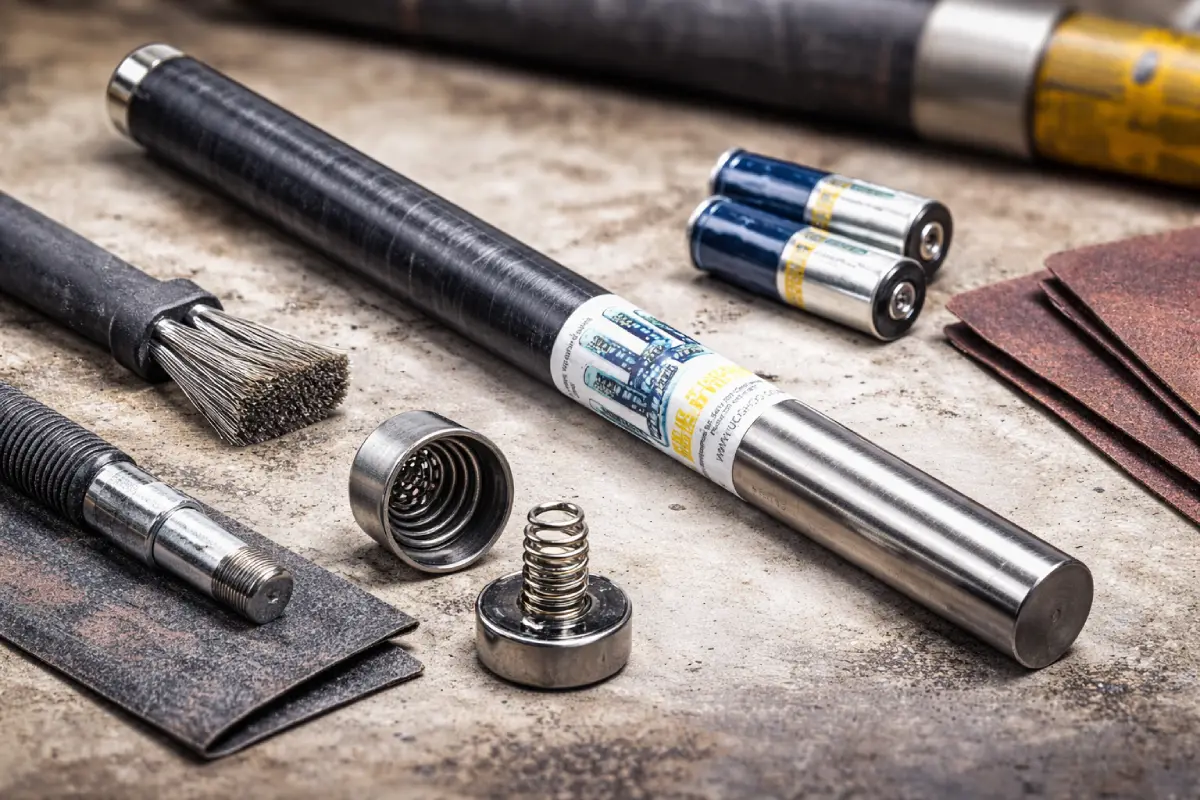
Most Falcon F5 “battery problems” come down to one thing: poor electrical contact in the battery compartment. The fix is rarely exotic. It’s usually cleaning, inspection, and correct assembly.
This guide stays inside what the manufacturer’s care guidance supports: clean oxidation from the battery contact spring and threads, protect and inspect the O-ring, and use the battery system exactly as intended. It also flags what not to do—especially unapproved changes and chemical cleaning.
If you complete the steps below and the unit still won’t run reliably, stop. At that point, the issue is likely beyond basic field refurbishment. UCG HDD provides Falcon F5 Transmitters repair, including battery-compartment and power-contact issues, when field care isn’t enough.
What “Battery Contact Repair” Means on a Falcon F5
On a Falcon F5, “battery contact repair” is not about redesigning anything. It’s about restoring a clean, consistent path for power. The manufacturer’s instructions focus on three places where contact problems start: the contact spring, the threads inside the battery compartment, and the battery end cap.
Oxidation is the usual offender. It builds on metal surfaces and interferes with the connection. The supported fix is direct and practical: clean the contact spring and threads to remove oxidation. The manufacturer specifically calls out using emery cloth or a wire brush for this job. That’s the core of refurbishment—remove the barrier, restore metal-to-metal contact, and keep the compartment sealing surfaces intact.
The O-ring matters just as much as the metal. The manufacturer ties O-ring condition to water intrusion risk and instructs operators to inspect it and replace it if damaged. During cleaning, the guidance also stresses protecting the O-ring; if needed, remove it while you clean so you don’t nick or deform it.
Finally, the manufacturer supports using a conductive lubricant on the battery cap threads after cleaning to prevent binding and help maintain good electrical contact. Keep the work simple: clean, protect, reassemble correctly.
What Not to Do (Because It Creates Bigger Problems)
A Falcon F5 is tough, but the battery compartment is not a place for guesswork. The manufacturer’s care guidance draws a clear line around what’s supported—and what isn’t.
First, do not use chemicals to clean the transmitter. That instruction is explicit. Chemical cleaners can damage materials and leave residues where you need clean contact and reliable sealing. Stick to mechanical cleaning for oxidation and careful wiping for debris.
Second, avoid unapproved changes or modifications. The manufacturer warns that changes not approved can void warranty protections and can affect authorization to operate under FCC rules. That means you should not “improve” contact with improvised hardware, alter parts to fit, or change the electrical setup beyond what’s described for the transmitter’s supported battery configurations.
Third, don’t mix and match key parts. The manufacturer instructs operators to use only the battery cap that accompanied the Falcon transmitter. A mismatched cap can create fit issues and can crush batteries or alter the overall stack length. In the field, cap swapping happens easily. It also causes avoidable problems.
Last, don’t turn refurbishment into force. If threads bind, don’t muscle through. Binding usually means dirty threads, O-ring mis-seating, or debris—issues you can fix with careful cleaning and correct reassembly. The goal is smooth engagement, clean contact, and an intact seal.
Tools and Setup for a Clean Refurbishment
You don’t need a full bench to do this well. You do need control. A battery compartment refurbishment fails when grit gets into threads, when the O-ring gets damaged, or when cleaning is rushed.
Use basic, supported tools: emery cloth or a wire brush for oxidation removal, clean wipes, and a small amount of conductive lubricant for the battery cap threads. Work in good light. Keep parts off the ground. Treat the O-ring like a sealing component, not an accessory.
Before you start, read the compartment like a mechanic reads wear patterns. Look at the contact spring and threads. If they’re dull, rough, or visibly oxidized, you’ve likely found the cause of the intermittent connection. Check the O-ring condition and seating. The manufacturer’s guidance ties O-ring damage to potential water intrusion, so don’t ignore it.
Plan to keep the O-ring out of harm’s way during cleaning. If you clean threads with the O-ring in place, you can drag abrasive dust across it or nick it with a brush. Removing it for cleaning (when appropriate) keeps the seal intact and makes your work cleaner.
This isn’t about overthinking. It’s about doing the basics well, the same way every time: clean the contact surfaces, protect the seal, and reassemble without forcing parts.
Step-by-Step: Battery Contact Cleaning and Refurbishment
Protect the O-ring and inspect the seal
Start by removing the battery end cap and batteries. As soon as the compartment is open, treat the O-ring as the priority item. The manufacturer’s care guidance tells operators to inspect the O-ring and replace it if damaged, because a damaged O-ring may allow water into the battery compartment. That’s a direct reliability issue.
If your cleaning will touch the sealing area or threads near the O-ring, remove the O-ring first so you don’t damage it during abrasion. Set it aside where it won’t pick up grit. Keep it clean. A small nick can turn into a leak path.
Inspect the O-ring carefully. You’re not looking for perfection. You’re looking for damage: cuts, tears, or clear deformation. If it’s damaged, don’t reuse it. Replacement is part of proper care because it protects the battery compartment from water intrusion.
When you reinstall the O-ring, make sure it seats cleanly and evenly. Don’t pinch it. Don’t twist it. A clean, properly seated O-ring supports the seal the transmitter relies on. This step doesn’t feel like “repair,” but it prevents the kind of failure that cleaning can’t fix.
Clean the contact spring and threads to remove oxidation
Now restore the electrical path. The manufacturer’s instructions call out cleaning the contact spring and the threads inside the battery compartment and on the battery end cap to ensure a proper power connection. Oxidation on these surfaces can interrupt the circuit.
Use emery cloth or a wire brush to remove oxidation. Work with control. You want clean conductive surfaces, not damage. Focus on the contact spring surfaces and the threaded areas that provide electrical continuity when the cap is installed. Remove oxidation until you have clean, consistent metal contact points.
As you clean, keep debris from falling into the compartment. Wipe out loosened particles as you go. You’re not trying to polish the transmitter; you’re trying to remove the film that blocks contact.
Do not use chemical cleaners. The manufacturer warns against chemicals for transmitter cleaning. Keep it mechanical and simple: abrasion to remove oxidation, wiping to remove debris, and careful handling to protect the seal and threads.
Lubricate threads correctly and reassemble without forcing
After cleaning, the manufacturer supports applying a conductive lubricant to the battery cap threads to prevent binding. Use a small amount. The goal is smooth engagement and reliable contact, not a coated compartment.
Reinstall the O-ring if you removed it. Make sure it is seated correctly and remains clean. Then reinstall the batteries using the correct configuration for your battery type. Thread the battery cap on smoothly. If it binds, stop and correct the cause—dirty threads, debris, or an O-ring that isn’t seated properly.
The manufacturer notes that transmitters ship with a special battery contact spring and a nickel-based anti-seize lubricant on the battery end cap to aid electrical contact. That detail matters for refurbishment: you are not doing something unusual by cleaning and re-lubricating properly. You’re restoring what the system expects.
Finish by checking that the cap seats properly and the assembly feels consistent. Smooth threads and correct compression support reliable operation. Rough threads and forced tightening create repeat problems.
Correct Battery, Spring, and Cap Setup (Where Many Problems Start)
Battery contact issues don’t always come from dirt. Sometimes the transmitter is assembled incorrectly. The manufacturer’s guidance is specific about spring use and cap matching, and those details matter.
If you use two C-cell batteries, the manufacturer instructs operators to include the battery contact spring that came with the transmitter. That spring is part of the designed stack length and contact pressure for the two-battery setup.
If you use a single SuperCell™ battery, the spring rule changes: the manufacturer instructs operators not to use the spring at either end of the SuperCell battery. Using a spring where it doesn’t belong can change fit and contact behavior and can create problems that look like a “bad transmitter” when the real issue is assembly.
The battery cap is also not interchangeable. The manufacturer instructs operators to use only the battery cap that accompanied the Falcon transmitter. Using a different cap can crush batteries or alter overall length. Treat the cap as matched hardware.
Battery condition and voltage matter as well. The manufacturer warns against using damaged lithium batteries and flags limits related to voltage (including cautions tied to voltage above a stated threshold). In practical terms, use known-good batteries and follow the supported configuration. If you’re troubleshooting contact problems, eliminate variables: correct batteries, correct spring use, correct cap, clean contacts.
When to Stop Field Refurbishment and Move to Repair Service
Field refurbishment has a clear endpoint: you clean oxidation from the contact spring and threads, protect and inspect the O-ring, apply conductive lubricant on threads to prevent binding, and reassemble using the correct battery, spring, and cap setup. If the transmitter still won’t operate reliably after that, the problem is likely beyond basic contact care.
At that stage, the worst move is to improvise. The manufacturer warns against unapproved changes and modifications, with potential consequences for warranty protection and authorization to operate. That’s not abstract language. It’s a practical signal: don’t push into unsupported territory when the supported steps didn’t solve the issue.
Instead, document what you did: which battery type you used (two C-cells or a single SuperCell), whether the spring was used as instructed, what you observed on the threads and spring, and the condition of the O-ring. Those details help a repair technician move fast and avoid repeating field steps.
UCG HDD supports HDD contractors and utility crews with repair services for drilling electronics, including Falcon transmitter battery-compartment and power-contact issues that persist after proper cleaning and correct setup. If you’ve done the supported refurbishment steps and you still have a power problem, it’s time to get it serviced—without guesswork and without unapproved modifications.
Quick Checklist
- Clean oxidation from the contact spring and threads using emery cloth or a wire brush
- Protect and inspect the O-ring; replace it if damaged
- Apply a small amount of conductive lubricant to the battery cap threads to prevent binding
- Use the spring only as instructed: two C-cells = spring, single SuperCell™ = no spring
- Use only the battery cap that accompanied the transmitter
- Do not use chemicals to clean the transmitter
- Avoid unapproved modifications; stop and send for service if supported steps don’t solve it


Comments are closed.